CCC: Call of the Giant Eagle
- 0.0
- Rating
- 100.00K
- Installs
- Free
- Price

 Analysis by App-foxy
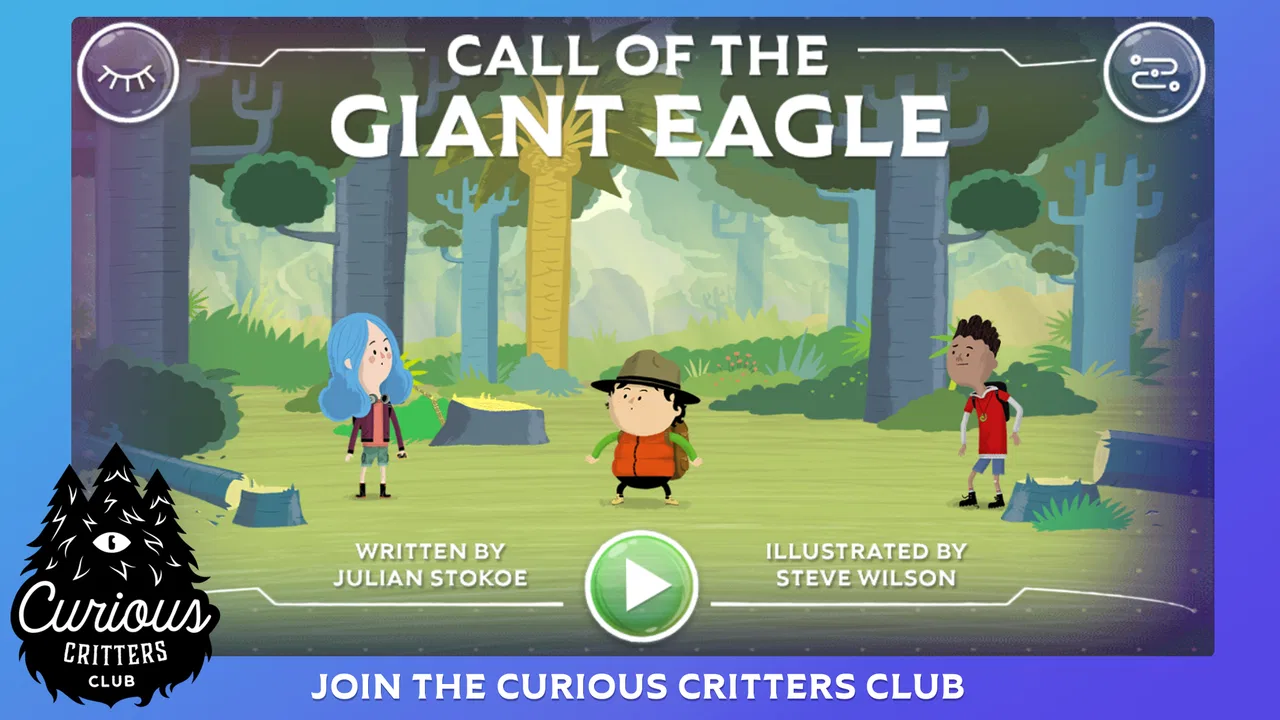
CCC: Call of the Giant Eagle is a children’s comics app built around an interactive storybook adventure with the Curious Critters Club of New Zealand. I approached it less like a conventional game and more like a guided reading experience: something to open when a child wants a story that feels more responsive than a printed book, but less demanding than a full game. That distinction matters, because its appeal comes from the combination of illustrated storytelling and interaction rather than from complex controls, competition, or long-term progression.
Developed by Yoozoo Ltd, the app sits in the comics category and is free to use. It is rated for Everyone, which makes its intended audience easy to understand, although younger children will probably get more from it with an adult nearby. The listing shows over one hundred thousand installs, while the current version is 1.6 and the app can run on devices using Android 4.0.3 or later. The average rating displayed is 0.0, so I would not treat the store rating as useful guidance when deciding whether the experience suits your family.
How the story feels when the connection is part of the experience
The most important thing to understand before opening CCC: Call of the Giant Eagle is that connectivity can shape the practical experience even when the story itself is the main attraction. Interactive storybook apps often depend on a connection at certain points, such as initial access, loading illustrated material, or moving between sections. I therefore would not plan a child’s first session in a place where the network is unreliable. A calm introduction at home gives the app the best chance to make a good first impression.
You May Also Like

 Blood Strike: 2.5 Anniversary
Blood Strike’s Loadouts Turn Every Drop Into a Tactical Gamble
A close look at Blood Strike’s custom loadouts: how fast access to signature weapons reshapes its battle royale rhythm, rewards preparation, and narrows the gap between fights.

 Pandora - Music & Podcasts
Pandora’s Music Is Easy to Start, but Harder to Recover
Pandora’s strength is its low-effort path from a seed to a station. Its weak spot is how much confidence it asks you to place in connection, setup, and quiet recovery.

 8 Ball Pool
 Is Built on Rivalries, Rematches, and Routine
A close look at the rivalries, rematches, shared routines, and unanswered safety questions that turn a quick pool match into a persistent mobile community.

 Samsung Music
’s Quiet Strength Is Playing What You Already Own
Its reach comes less from spectacle than from dependable access to a personal library. That simplicity is both the app’s strongest retention engine and its ceiling.

 AccuWeather: Weather Radar
AccuWeather Review: A Quick, Clear Forecast for Everyday Decisions
For everyday plans, the best forecast is the one you can understand quickly. AccuWeather makes rain timing, radar, and local conditions easy to act on, with a few trade-offs.

 Hill Climb Racing
Why Hill Climb Racing Still Turns Crashes Into One More Run
A tiny car, a bumpy hill and one more upgrade: Hill Climb Racing keeps resurfacing because its simple chaos makes every near-miss feel personal.
More From Our News Desk



That recommendation is especially relevant for families who expect a traditional picture book. With paper, the story begins immediately and remains available regardless of signal. With a digital title, a pause while content loads can look like a broken page to a young child. The difference is small for an adult, but it can interrupt the rhythm of reading for someone who is still learning to follow a narrative. I found that the app makes more sense when treated as a prepared activity rather than as something to hand over during a sudden moment of boredom.
The network question also affects how much supervision is useful. An adult can tell whether a delay is part of the transition or simply a connection problem, while a child may repeatedly tap the screen and make the situation harder to understand. My practical advice is to open the app before inviting a child to take over, let the first screen settle, and keep the device in a place with a stable connection. This is not exciting advice, but it prevents a technical pause from becoming the main event.
There is a positive side to this connected format. A digital story can feel more inviting than a static comic because the reader is encouraged to participate rather than only turn pages. The Curious Critters Club setting gives the experience a clear identity, and the giant eagle premise provides a natural reason for children to stay curious about what happens next. I would use it as a shared reading prompt, asking a child what they think the characters will discover instead of rushing through the screens.
The strongest use is guided reading, not unsupervised screen time. That is the first non-obvious trade-off. The app’s interactive presentation may hold attention better than an ordinary comic for some children, but it also makes the adult’s role more important when a connection slows down or when the child needs help understanding what to do next. It is best viewed as a bridge between reading and play, not as a replacement for either one.
What it offers that a normal comic does not
A printed comic gives children control over pace, but its interaction is limited to looking, turning pages, and discussing the pictures. A conventional mobile game usually asks for repeated actions, goals, and some kind of challenge. This app occupies the middle ground. Its value is in making a story feel like an activity without demanding the reflexes, competition, or complicated rules found in many games.
That makes it a useful choice for a child who enjoys pictures and stories but is not ready for action-heavy games. It can also work for a parent who wants to read together while allowing the child to participate through the device. The New Zealand setting gives the title a more specific flavor than a generic cartoon reader, and the Curious Critters Club provides a group of characters around which conversation can develop.
Still, readers should keep expectations realistic. Anyone looking for a deep comic library, branching storytelling, a difficult puzzle system, or a long progression loop will probably find the experience too narrow. Its strength is focus. It presents one storybook-style adventure rather than trying to become a complete entertainment platform. That focus is welcome for a short shared session, but it limits replay value for older children who want constant novelty.
Using it in real mobile situations
I would choose this app for a quiet afternoon at home, a short waiting period at a relative’s house, or a parent-and-child reading session before bed. Those situations give the story room to breathe and make it easier to respond if a screen takes longer to load. I would be more cautious about using it as the only activity during travel, especially somewhere with inconsistent mobile service. A child who has been promised a story may not understand why the adventure suddenly stops being available.
That leads to a second useful insight: the app is more dependable as a planned activity than as an emergency distraction. Parents often keep a phone or tablet ready for queues, appointments, or journeys, but a connection-sensitive storybook should be tested in the exact kind of setting where it will be needed. Open it at home, move through the early experience, and see how the device behaves before relying on it outside.
Screen size also changes the experience. On a larger tablet, illustrations and text should be easier for two people to share, while a smaller phone is more convenient for one child holding the device. I would avoid placing the screen too far away during joint reading, because the point is not simply to keep the child occupied. The best moments come when the adult can see the same scene and turn it into a conversation about the characters, the setting, or the child’s prediction.
For younger users, a simple routine helps. I would start by explaining that this is a story to explore rather than a game to win, then let the child lead the pace. If the app pauses, I would wait instead of tapping repeatedly. If the child loses interest, I would stop rather than pushing through the whole adventure. That approach respects the app’s storybook nature and avoids turning a gentle reading experience into a test of endurance.
What happens when loading fails or the session breaks
Connectivity problems are not always dramatic. A slow transition, a blank moment, or a screen that appears unresponsive can be enough to break a child’s concentration. The useful response is to treat the issue methodically: stop tapping, check whether the connection is still working, and give the app a moment before closing it. Repeated taps can make it difficult to tell whether the app is processing an action or simply waiting.
If the session does fail, I would reopen the app only after checking the basic conditions around it. Is the device connected? Is another app consuming the connection? Is the battery very low or the device struggling with several open apps? These are ordinary mobile checks, but they matter more with children because the emotional cost of a failed session can be higher than the technical problem itself. A parent who stays calm can turn the interruption into a short break instead of a frustrating argument.
The recovery workflow I recommend is simple: return to the app, look for the last stable story screen, and avoid assuming that every interruption means progress has been lost. If the story restarts, use that as a chance to revisit the earlier scene rather than rushing. I cannot promise how every device will handle a disrupted session, so I would not build an important event around reaching a particular point in the story. For a free app, that is a reasonable limitation to accept, but it is still worth planning around.
Older devices deserve extra patience. The minimum operating system is Android 4.0.3 or later, which makes the app accessible to a broad range of Android hardware, but operating-system compatibility is not the same as a guarantee of identical performance on every phone or tablet. A device that is technically supported may still feel slower than a newer one. Before a child uses it, I would close unnecessary apps and make sure the device has enough charge for a complete reading session.
This is also where the app differs from a physical comic most clearly. A paper book can be dropped, picked up, and continued without troubleshooting. The digital version offers a more active presentation, but the price of that convenience is another layer between the reader and the story. Families who dislike dealing with loading screens may prefer a printed book or a reading app whose content is known to remain available without a network connection.
Keeping mobile data use under control
Because the experience is visual and connected, I would introduce it over Wi-Fi rather than assuming a mobile data plan will be comfortable with every session. The safest habit is to open and explore it at home first, then decide whether it is suitable for use away from Wi-Fi. This is particularly sensible when a child may replay scenes or reopen the app several times without thinking about data consumption.
I would also avoid handing the device over while it is doing unrelated downloads or updates. A busy connection can make the story feel less responsive, and it becomes harder to know which activity is using data. Keeping the session focused has two benefits: the app has a better chance of loading smoothly, and the parent has a clearer idea of what the device is doing.
A third practical tip is to separate “testing” from “travel preparation.” Try the app on the home network, then close and reopen it later to see how it behaves in an ordinary session. Do not assume that a story opened once will behave exactly the same way in a train, car, waiting room, or holiday rental. This is not a criticism unique to the title; it is the central compromise of using a connected interactive book instead of carrying a physical one.
Families with limited data should be especially deliberate. The app is free, which removes a purchase barrier, but free does not automatically mean cost-free in every practical sense. A child may not notice how often a device reconnects or reloads visual content. I would use Wi-Fi for regular reading, monitor the device’s data settings if necessary, and keep another activity available for places where the signal is uncertain.
Who should choose it, and who should look elsewhere
I would recommend CCC: Call of the Giant Eagle to parents seeking a short, story-led digital activity for children, especially when they are willing to read alongside the child. It is also a reasonable option for families who want something gentler than a reflex-based game and more interactive than a standard comic. The Everyone rating supports that broad family positioning, but adult involvement remains valuable because the child may need help with navigation or with interpreting a delay.
I would skip it if your main requirement is guaranteed access during flights, road trips, or weak-signal locations. I would also look elsewhere if your child expects constant rewards, complex puzzles, competitive play, or a large collection of separate stories. A traditional comic is better for instant, dependable reading. A full game is better for challenge and replay. This title earns its place between those choices, but only if that middle ground is what you actually want.
The app may also be a poor fit for an older reader who has outgrown simple interactive storytelling. The Curious Critters Club concept is clearly aimed at a young audience, and the experience is most useful when its simplicity feels welcoming rather than limited. I would judge it by whether the child talks about the story, asks questions, or wants to explore it with you—not by whether it provides the depth of a larger game.
One detail I appreciate is that the experience can support conversation without requiring a parent to invent a complicated lesson plan. Ask the child to describe what they see, predict what the giant eagle might mean, or explain why a character made a choice. Those prompts turn a potentially passive screen session into shared reading. That is a stronger reason to install it than simply hoping the app will keep a child quiet.
My final view on the connected reading experience
CCC: Call of the Giant Eagle is a focused comics app with a clear audience and a pleasant middle position between a picture book and a mobile game. Its free price and Everyone rating make it easy to try, and its older Android support means it may work on devices that cannot run newer entertainment apps. Yoozoo Ltd has presented it as an interactive storybook adventure, and that is the right lens through which to judge it.
My reservation is not about the idea of the storybook; it is about relying on a connected mobile experience when a child expects immediate reading. Network interruptions, device performance, and data habits can all affect the session. Those issues are manageable if you prepare at home, use Wi-Fi where possible, and stay nearby during the first few readings. They are less manageable if you need a guaranteed offline activity or a completely hands-off distraction.
In the end, I see it as a good companion for shared reading rather than a replacement for books or games. Use it when you want a child to explore a specific adventure with you, keep the session relaxed, and treat connectivity as part of the setup rather than an invisible detail. If that matches your needs, this small story-focused app is worth trying; if you need robust offline access or deeper gameplay, a different category will serve you better.
FAQs for CCC: Call of the Giant Eagle
01What is the main objective of CCC: Call of the Giant Eagle?
CCC: Call of the Giant Eagle is an action-adventure game where players embark on a journey to summon and control a powerful giant eagle. The main objective is to complete various quests and challenges across mystical landscapes, using the eagle's abilities to defeat enemies and solve puzzles.
02Is CCC: Call of the Giant Eagle available on both Android and iOS?
Yes, CCC: Call of the Giant Eagle is available for download on both the Android and iOS platforms. Users can find the game in the Google Play Store for Android devices and the App Store for iOS devices. Ensure your device meets the minimum system requirements for optimal performance.
03Are there any in-app purchases in CCC: Call of the Giant Eagle?
Yes, CCC: Call of the Giant Eagle offers in-app purchases. Players can buy various items, such as special abilities, costumes, and power-ups to enhance their gameplay experience. While these purchases can be helpful, they are optional, and players can still enjoy the game without them.
04What are the minimum device requirements to run CCC: Call of the Giant Eagle smoothly?
To run CCC: Call of the Giant Eagle smoothly, Android users should have at least Android version 7.0 or higher, with 2GB of RAM. iOS users need iOS 11.0 or later. A stable internet connection is recommended for downloading updates and accessing online features.
05Does CCC: Call of the Giant Eagle offer multiplayer options?
Currently, CCC: Call of the Giant Eagle is a single-player experience focused on narrative-driven gameplay and exploration. However, the developers have hinted at potential future updates that might include multiplayer features, allowing players to team up and explore the game's world together.
Pros
- Stunning graphics with detailed environments.
- Engaging multiplayer mode with friends.
- Regular updates with new features.
- Intuitive controls for smooth gameplay.
- Variety of missions to keep you hooked.
Cons
- Large file size may need extra storage.
- In-app purchases can be pricey.
- Requires constant internet connection.
- Battery drains quickly during play.
- Occasional lag in high-traffic areas.

CCC: Call of the Giant Eagle
Gallery